 Weaver
Site meeting minutes template: free Word and PDF download
Site meeting minutes record what was discussed and decided at a construction meeting, and who will do what by when. If they are missing or vague, people argue later about who agreed to what. This template gives you every field in one file you can fill in straight away. It is free to use, with no sign-up and no email address needed.
Download the Word template (.docx) Download the PDF template
Edit the Word file as you like, or print the PDF and fill it in by hand. There is a marked box at the top right where you can place your own logo.
What site meeting minutes should contain
- Header: project, minutes number, date, location, start and end time, minute taker.
- Attendees: name, company, role, present or apologies. Add the distribution list: who receives the minutes?
- Open items from the previous minutes: what is done, what is still open?
- Discussion items: numbered, with the current status in a few sentences.
- Decisions: what was decided, one sentence each.
- Actions: what, who is responsible, by when, and the status.
- Next meeting: date and location.
Write actions that can actually be closed
Every action needs exactly one responsible person and a due date. "The electricians will sort it out" is not an action. "Ms Moser submits the revised ventilation plan by Saturday" is. Open the next meeting with the actions from the last minutes. People see that the minutes are read, and commitments do not get lost.
How to fill in the template
- Complete the header before the meeting. It saves time and avoids missing details.
- Tick off attendees during the meeting and write decisions down immediately, not in the evening.
- For each decision, note what it refers to (building element, floor, trade).
- Send the minutes to the distribution list promptly, so objections come up early.
Example: a completed set of minutes
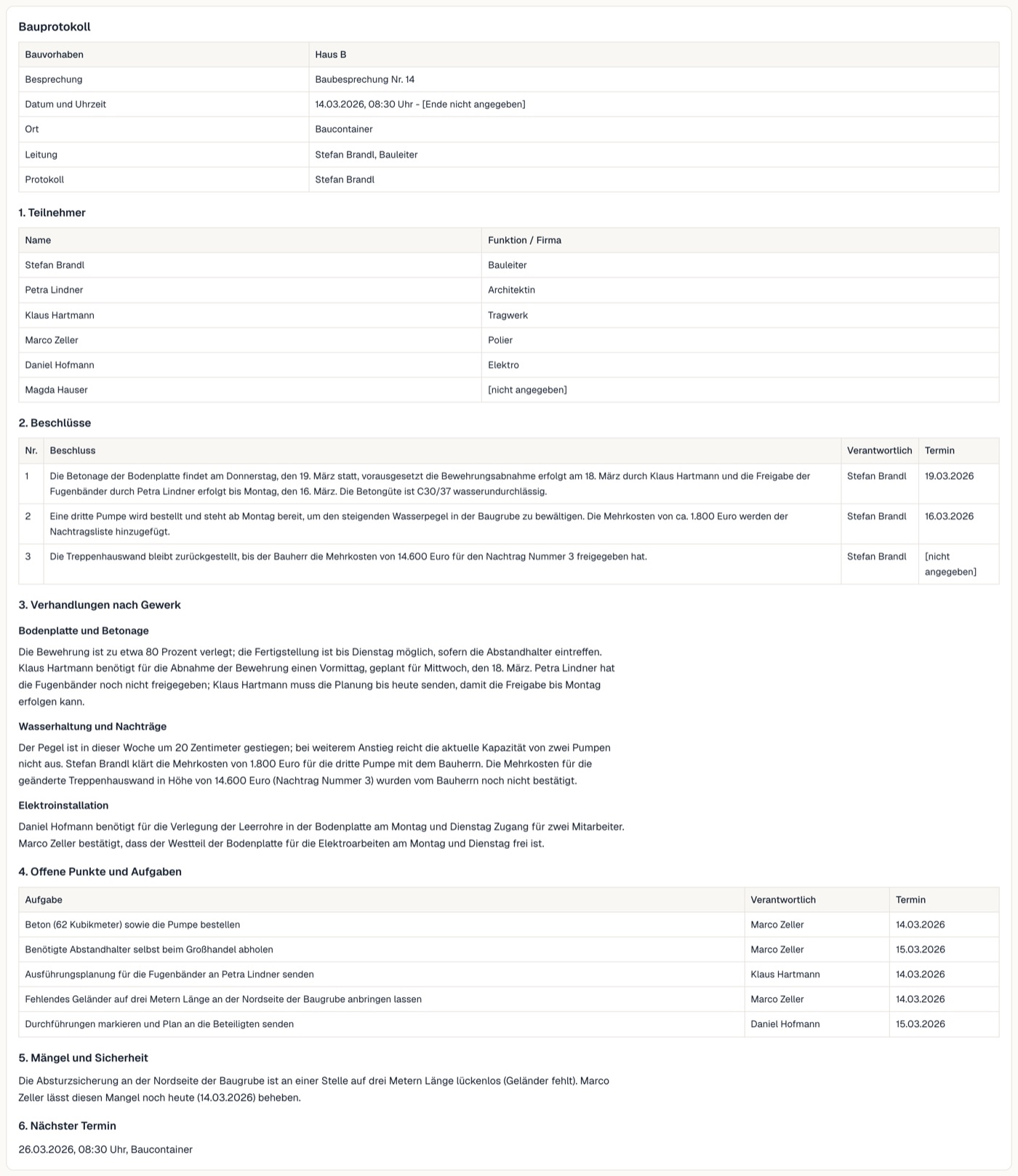
The example shows how the parts work together. Decision 1 sets the pour of the foundation slab for Thursday 19 March, on two conditions: the reinforcement is signed off on 18 March and the waterstops are approved by Monday. The decision has one responsible person and a date. Below it are the actions, for example "order the concrete and the pump", each with an owner and a due date. This split into status, decision and action with an owner and a due date is exactly what the template follows.
If you would rather not type the minutes yourself
Typing up minutes after every site meeting takes time. Weaver transcribes your meeting and deletes the audio right after. From the conversation it builds the minutes, decisions and actions with an owner and a due date. Before recording, the app asks whether everyone agrees, so tell all attendees beforehand.
See how Weaver works Try it with sample data
Frequently asked questions
What should site meeting minutes contain?
A header (project, minutes number, date, location, minute taker), attendees and distribution list, open items from the previous minutes, numbered discussion items, decisions, actions with an owner, a due date and a status, and the date and location of the next meeting.
Is the template really free?
Yes. You can download the Word and the PDF file without signing up and without an email address, and use them freely.
How do I word an action in the minutes?
Every action has exactly one responsible person and a due date, for example: "Ms Moser submits the revised ventilation plan by Saturday." A line such as "The electricians will sort it out" is not an action.
When should I send out the minutes?
Promptly, to the whole distribution list, so objections come up early. Write decisions down during the meeting, not in the evening.
Can the minutes be created automatically?
Yes, with Weaver. The app transcribes your meeting and deletes the audio right after. From the conversation it builds the minutes, decisions and actions with an owner and a due date. Before recording, the app asks whether everyone agrees.